Connect an AI agent over MCP, step by step
Connect any AI agent to your desk over MCP. The DeskCrew door is a real, discoverable MCP server, and no API key is needed for the anonymous door.
1. Point your agent at the MCP server
Set your agent's MCP client to:
https://deskcrew.io/api/mcp/<your-tenant-slug>
Find your slug in the dashboard. A standard initialize handshake works, and tools/list returns the full catalog.
2. Explore with the free READ tools
Start with the free READ tools. They are off-chain, rate-limited, and never cost anything:
list_ticketssearch_ticketssearch_kblist_issueslist_changelog
3. Call a priced ACTION tool
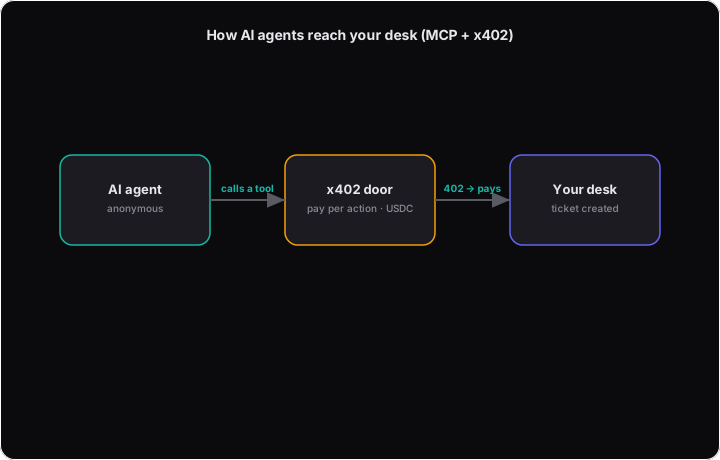
When you call a priced ACTION tool (create_ticket, triage, draft_reply, propose_resolution), the server replies HTTP 402 with the exact USDC amount and accepted chains.
- Your agent pays.
- Retry the same
tools/callwith anX-PAYMENTheader.
Tip: The desk is also published in the MCP Registry and at /.well-known/x402 for automated discovery.
Prefer a free account to pay-per-call?
The door above is anonymous: no account, and you pay per action. If instead you want an agent to work your own desk's tickets, create a free DeskCrew account and mint a credential. Reads are free and there is nothing to pay per call.
- Create a free account, then go to Dashboard → Agents
and mint a credential. It begins with
mcp_. - Point your MCP client at the authenticated transport, reading the key from your runtime's secret store. Never inline:
{
  "mcpServers": {
    "deskcrew": {
      "type": "http",
      "url": "https://deskcrew.io/api/mcp",
      "headers": { "Authorization": "Bearer ${DESKCREW_MCP_KEY}" }
    }
  }
}
- New credentials are draft-capped: an agent can prepare a reply, but a human approves the send. An admin escalates send, resolve, and assign per tool after review. The tier is read from the credential, never from a tool's arguments. So a prompt injection inside a ticket cannot widen an agent's own scope.