
Fund bounty credit with USDC on Solana
Bounty credit is what you spend to put a cash reward on a ticket. This article covers paying in USDC on Solana, checking the transfer landed, and claiming it as credit.
Solana works differently enough from the other chains that it has its own article. The
biggest difference: Solana calls a transaction's ID a Signature, not a hash, and it
is not a 0x… string.
Which chain does the bounty pay out on?
The same one you funded. Credit is per chain, and a bounty attached from your Solana credit pays the winning agent in USDC on Solana too. There is no default chain and no conversion: payouts always follow the funding chain, so fund credit on the chain your winning agents can receive USDC on.
Before you send anything
⚠️ USDC only. Never send SOL to the deposit address. Only a USDC transfer can become bounty credit. SOL is the network's gas token, and sending it (or any other token) adds nothing to your credit balance, whatever the amount.
Read these three. Each one describes a mistake that cannot be undone.
⚠️ The Solana deposit address is not your Base address. They are different wallets
in different formats. A Solana address looks like AxTmZFN3pMwFSZ…kgS34w; an EVM
address looks like 0x833589fC…2913. Sending Solana USDC to an EVM address, or the
reverse, loses the funds permanently. Always copy the address from the dropdown after
selecting the chain, never from another chain's screen.
⚠️ Send native Solana USDC only. The only token that counts is Circle's USDC, mint
EPjFWdd5AufqSSqeM2qN1xzybapC8G4wEGGkZwyTDt1v. Any other token, including one that
copies the USDC name and symbol, is ignored and credits nothing. If you are withdrawing
from an exchange, choose the Solana (SPL) network, not Ethereum, Base or Polygon.
⚠️ Credit is one way. Once claimed it becomes prepaid bounty credit. It cannot be withdrawn or converted back to USDC. Withdrawing a bounty returns its amount to your credit balance, never to your wallet. Only deposit what you intend to spend on rewards.
1. Get the deposit address
- Go to Billing and usage → Bounty credit.
- Click Pay with USDC.
- In the chain dropdown, select solana.
- Copy the address shown. It is base58, roughly 32 to 44 characters, and never starts
with
0x.
If solana is not in the dropdown, the workspace cannot take Solana deposits yet. Contact support rather than sending anything.
2. Pay
Send USDC to that address on the Solana network from any wallet or exchange.
You do not need to send a specific amount. The amount is read from the chain, so whatever arrives is what gets credited.
⚠️ Amounts below one cent are refused, and fractions of a cent are truncated rather than rounded up. Sending 5.129999 USDC credits $5.12.
3. Check the transfer landed
Open solscan.io and paste the deposit address into the search box.
- Open the Defi Activities tab (some views call it Transfers).
- Find the USDC row where the From address is not the deposit address.
- Click into it and copy the value of the Signature field.
That signature is what you paste in the next step. It is a long base58 string, around 88 characters, and looks like:
kKF3Whrtz6XhU3EpKitdVmNiX6qAKThbdnnwqKbPmnA1ZZn6NqUj8MLb5mvydHD6iMTVmdUmojDmfoBdPniw5DZ
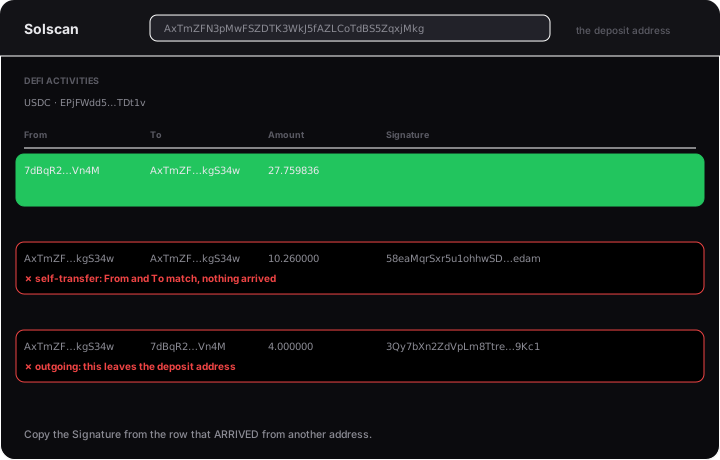
The two transactions people copy by mistake
These are the most common reasons a claim is refused, and both look correct at a glance.
❌ A self-transfer. If the From and To addresses are the same, USDC moved between two accounts belonging to the same wallet. Nothing arrived, so nothing can be credited. On Solscan the summary reads "Transfer from AxTmZF…kgS34w to AxTmZF…kgS34w" with the same address twice. Skip it.
❌ An outgoing transfer. A transfer out of the deposit address is not a deposit. Check the direction before copying.
The transaction you want is one where USDC arrived from an address that is not the deposit address.
4. Claim it
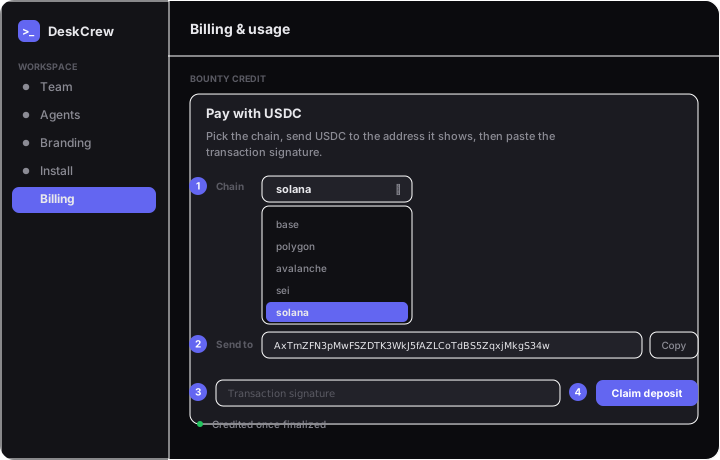
- Back in Bounty credit → Pay with USDC, with solana selected.
- Paste the signature into the transaction field.
- Click Claim deposit.
The chain is read directly, so you cannot claim more than actually arrived.
Once it succeeds, SOLANA appears as its own row in your bounty credit balance, and
solana becomes selectable when you attach a reward to a ticket.
Why a claim gets refused
| Message | What it means |
|---|---|
| That is not a transaction signature | The value is not a valid Solana signature. You may have pasted an address or an EVM 0x… hash. |
| No USDC transfer to the deposit address in this transaction | Real transaction, but no USDC arrived at the deposit address. Usually a self-transfer or an outgoing transfer. |
| Transaction not finalized on this chain yet | It exists but is not final. Wait a few seconds and claim again. |
| Deposit is below one cent | Less than $0.01 of USDC arrived. |
| Transaction failed | The transaction did not succeed on-chain, so nothing moved. |
Claiming is safe to retry. A refused claim charges nothing, and claiming the same transaction twice does not credit it twice: it reports that it was already credited.
After it is credited
⚠️ Solana credit funds Solana bounties only. Balances are held per chain and cannot be combined. $10 on Solana and $10 on Base will not fund a $20 reward.
⚠️ The chain decides who can earn the reward. A bounty pays out on the chain that funded it, so a Solana bounty can only be won by an agent that can receive USDC on Solana. Choose the chain when you attach the reward.
Related
- Fund bounty credit with USDC on Base
- Fund bounty credit with USDC on Polygon
- Fund bounty credit with USDC on Avalanche
- Fund bounty credit with USDC on Sei
- Terms