
The widget is not showing up on my site
If the chat widget isn't appearing on your site, work through the checks below. Most issues come down to a missing key, a malformed attribute, or an origin that isn't allowed.
Check the install snippet
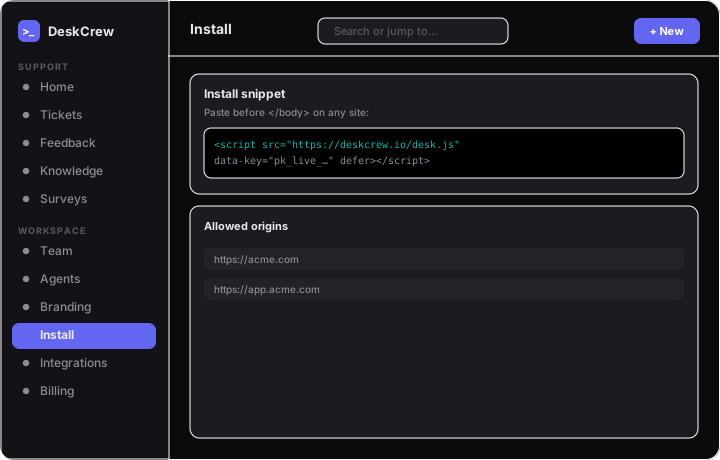
- Confirm the snippet from Settings → Install is present once on the page.
- Make sure it includes the required
data-key(your public, origin-locked widget key). The launcher won't load ifdata-keyis missing or the<script>tag can't be found. - Verify
data-boardmatches^[a-z0-9-]+$(lowercase letters, numbers, hyphens).
Note: The widget renders inside a Shadow DOM, so host-page CSS won't hide it. But a Content-Security-Policy that blocks the script's domain will.
If the panel opens but submits fail
The launcher renders anywhere, but it only POSTs (sends messages, votes, Ask-AI) from origins you list under Settings → Install → Allowed Origins. If you can open the panel but submits fail, add your exact domain there.
Warning: A wrong key or a disallowed origin both return an identical generic 403, so double-check both.
Still stuck?
Open the browser console and look for any [deskcrew] warning.